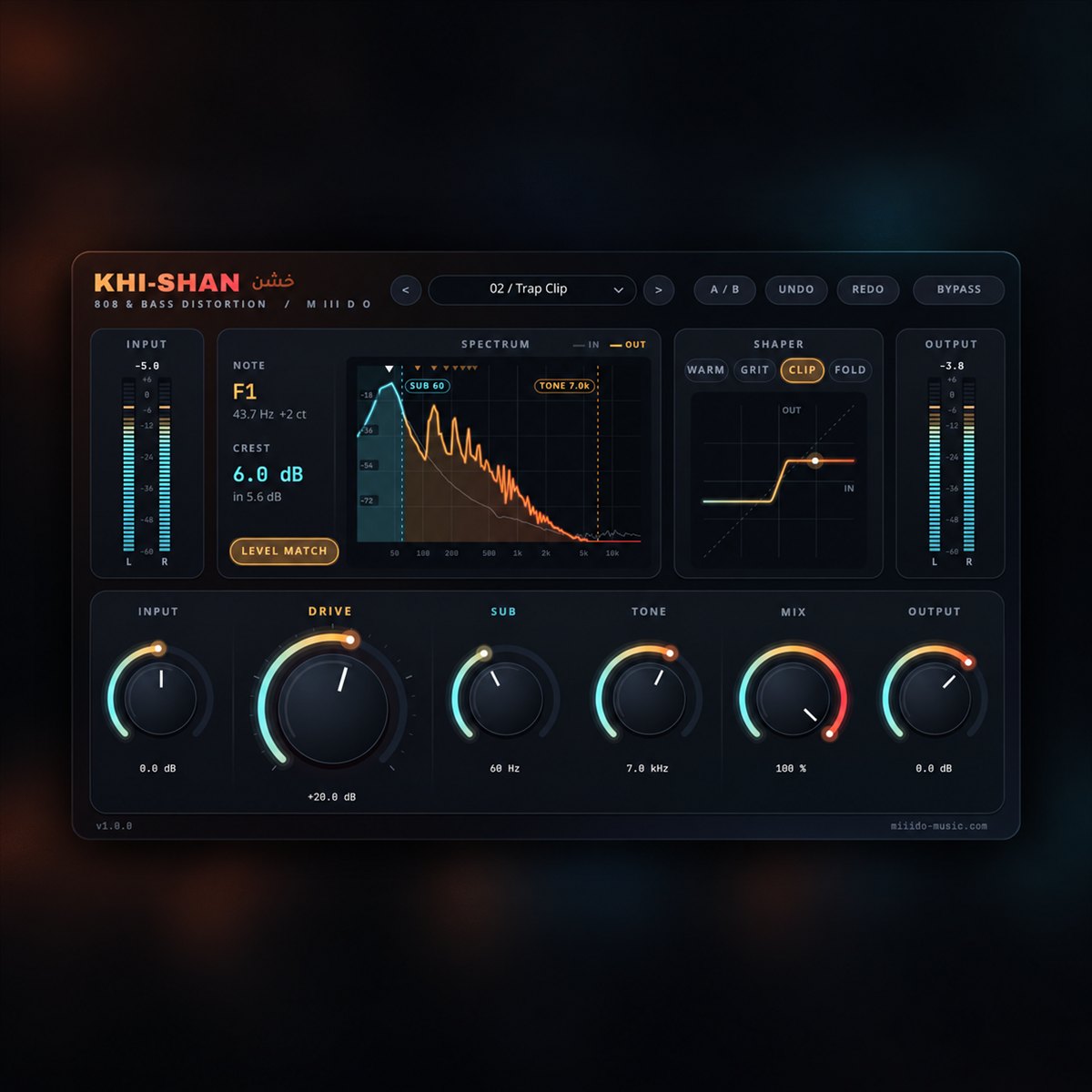
Khi-Shan free 808 distortion plugin interface, with the Trap Clip preset New
Plugins  /  Free 808 distortion · VST3 / CLAP

Khi-Shan

Free 808 and bass distortion for Windows. Four distortion curves, a clean-sub crossover that keeps the low end solid, and a note readout to tune your 808.

FreeVST3 / CLAPWindows 64-bit4 presetsZero latency4x oversampling

Free with a free account — it downloads the moment you are in. Already have one? Sign in

Download for
No activation, no licence keyInstant downloadNo card needed
Overview

Khi-Shan (from the Arabic khishin, rough) is a free distortion made for 808s and bass, for Windows 64-bit. It adds the harmonics that make a bass line audible on phones and laptops, while everything below the Sub frequency stays clean, solid and in tune. Level Match keeps the loudness steady while you turn up the heat, so you hear the tone, not just "louder". Zero latency and light on the CPU, so you can play and record through it.

At a glance

Contents
VST3 + CLAP · 4 presets · 4 curves · clean-sub crossover
Format
VST3 / CLAP
Size
3.3 MB (.zip)
Type
Plugin · Effect
Works on
Windows 64-bit
Version
1.0.0
Requirements
Windows 10 or 11, 64-bit · any DAW that loads VST3 or CLAP
In detail
01

What it does

  • Input (-24.0 dB to +24.0 dB): level into the plugin. More input also drives the distortion harder.
  • Drive (0.0 dB to +36.0 dB): the amount of distortion.
  • Mode (Warm, Grit, Clip or Fold): the distortion curve. Warm is smooth and adds mostly 2nd and 3rd harmonics, Grit is buzzy with strong even and odd harmonics, Clip pushes the 808 towards a square wave, and Fold folds the wave back on itself for a growl. Switching while the track plays does not click.
  • Sub (Off to 250 Hz): below this frequency the bass stays clean and only the part above is distorted, through a steep 24 dB/oct Linkwitz-Riley crossover that keeps both parts in phase. Fully left (Off) distorts the whole signal.
  • Tone (1.0 kHz to 22.0 kHz): a low-pass on the distortion only. Turn it down to take out fizz; the clean sub is not affected.
  • Mix (0 % to 100 %): blends the distortion with the clean signal for parallel distortion. The two stay phase-aligned at every setting.
  • Output (-24.0 dB to +12.0 dB): final level. Not a limiter.
  • Level match (on/off): keeps the loudness about the same while you change Drive or the curve, measured on 808 material for every curve.
  • Bypass, A/B, Undo / Redo: click-free bypass, compare two settings, step back through your changes.
02

See what your bass is doing

  • Spectrum: the output over the input, with the clean-sub region, the Sub and Tone frequencies, and markers on the note and its harmonics.
  • Note readout: the pitch of your 808 and how many cents it is off (A4 = 440 Hz), so you can tune it to the song.
  • Crest readout: the peak-to-RMS ratio after the distortion, with the input value below it. A lower number means a denser bass.
  • Shaper: the distortion curve for your Mode and Drive settings, with a dot that follows your signal.
  • Input / output meters (-60 to +6 dB): peak and RMS, with a held max-peak number. They turn red only above 0 dBFS.
03

4 presets to start from

Every factory preset plays an 808 back at about the same level as the dry signal, so you can compare them fairly.

  • Sub Warmth: warm harmonics so any 808 reads on small speakers; the sub below 90 Hz stays clean.
  • Trap Clip: square, loud trap 808 that cuts through a busy mix; sub clean below 60 Hz.
  • Drill Grit: raw, buzzy drill 808 for slides and glides; full-range distortion, darker top.
  • Growl Fold: folded growl blended under a clean sub, for Reese and synth bass.

You can also save and load your own presets.

04

Sound quality

  • Zero latency: no lookahead, 0 samples reported to your DAW, so you can play and record through it.
  • Oversampling (4x at 44.1 and 48 kHz, 2x at 88.2 and 96 kHz) plus antiderivative anti-aliasing on every curve keeps aliasing very low.
  • Mono and stereo tracks, 44.1 to 192 kHz.
05

Install

Download the zip from your account, close your DAW and run the Setup file. VST3 is always installed, and you can tick CLAP if your DAW supports it. If an earlier Khi-Shan is installed, Setup replaces it automatically. Then rescan your plugins: Khi-Shan is listed under M III D O. The installer isn't code-signed yet, so Windows may show an unknown-publisher notice. Choose More info, then Run anyway.

Questions

Asked before.

Is it really free?

Yes. Make a free account, download, done. No activation, no licence key, no trial.

Can I use it in a song I sell?

Yes. Anything you make with it is yours to release and sell.

Which DAWs does it work in?

Any Windows 64-bit DAW that loads VST3 or CLAP plugins, such as FL Studio, Ableton Live, Reaper, Cubase, Studio One or Bitwig.

Is there a Mac version?

Not yet. Windows 10 and 11, 64-bit only.

Will it mess up my sub?

Not with Sub on: everything below the Sub frequency passes clean. Turn Sub fully left (Off) when you want the whole 808 distorted.

Will it make my track louder?

Not with Level Match on: the loudness stays about the same while you add distortion, so you judge the sound, not the volume. Turn Level Match off if you want Drive to push the level.

Why does Windows warn me when I install it?

The installer isn't code-signed yet, so Windows doesn't recognise the publisher. Choose "More info", then "Run anyway".

Does it connect to the internet?

No. The plugin's own code makes no network requests.

Khi-ShanFree
Get it free