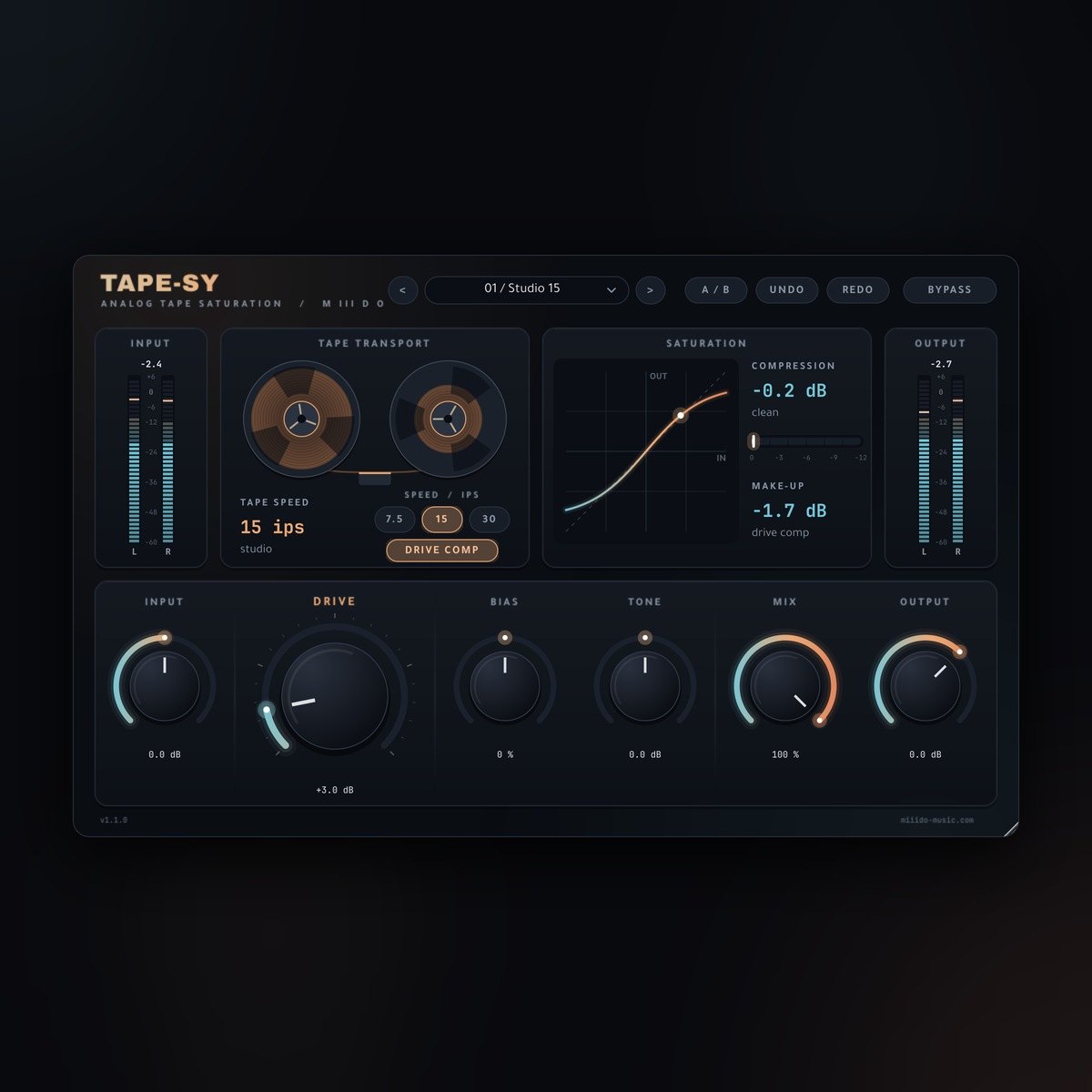
Tape-Sy free tape saturation plugin interface, with the Studio 15 preset New
Plugins  /  Free tape saturation · VST3 / CLAP

Tape-Sy

Free analog tape saturation for Windows. Warm harmonics, rounder transients and three tape speeds, for vocals, drums, bass and full mixes.

FreeVST3 / CLAPWindows 64-bit8 presets4x oversampling

Free with a free account — it downloads the moment you are in. Already have one? Sign in

Download for
No activation, no licence keyInstant downloadNo card needed
Overview

Tape-Sy is a free tape saturation plugin for Windows 64-bit. Like real tape, it saturates the highs first, so it softens harshness instead of just distorting, and it adds a gentle low-end bump that changes with the tape speed. Drive Comp keeps the level steady while you turn up the heat, so you hear the colour, not just "louder".

At a glance

Contents
VST3 + CLAP · 8 presets · 3 tape speeds
Format
VST3 / CLAP
Size
3.4 MB (.zip)
Type
Plugin · Effect
Works on
Windows 64-bit
Version
1.1.0
Requirements
Windows 10 or 11, 64-bit · any DAW that loads VST3 or CLAP
In detail
01

What it does

  • Drive (0 to 24 dB): tape saturation. Rounds transients and adds harmonics.
  • Bias (-50 to +50 %): shapes the character. Centred, the saturation is symmetrical; turned either way, it adds even harmonics for extra warmth.
  • Tone (-6 to +6 dB): a high shelf at 1.2 kHz before the tape. Brighter drives the highs harder; darker keeps them smooth.
  • Tape Speed (7.5, 15 or 30 ips): 7.5 is dark and worn with a strong low-end bump, 15 is balanced studio tape, 30 is open and bright.
  • Mix (0 to 100 %): blends the tape with the clean signal for parallel saturation. The two stay phase-aligned at every setting, so blending never dulls the top end.
  • Drive Comp (on/off): keeps the level within about 0.1 dB while you sweep Drive from 0 to 24 dB.
  • Input (-24 to +24 dB) and Output (-24 to +12 dB): gain into and out of the tape.
  • Bypass, A/B, Undo / Redo: click-free bypass, compare two settings, step back through your changes.
02

See what the tape is doing

  • Transfer curve: the shape of the saturation for your Drive and Bias settings, with a dot that follows your signal.
  • Compression meter: how much the tape is squashing the peaks right now, from clean to crushed.
  • Input / output meters (-60 to +6 dB): peak and RMS, with a held max-peak number. They turn red only above 0 dBFS.
  • Tape reels that turn at the selected speed while audio plays.
03

8 presets to start from

Every factory preset plays back at the same loudness as the dry signal, so you can compare them fairly.

  • Studio 15: clean studio tape at 15 ips, gentle warmth for anything.
  • Vocal Silk: smooth top end and a little density for lead vocals.
  • Drum Glue: rounds transients and glues a drum bus.
  • Bass Iron: thick, saturated low end for bass and 808.
  • Mix Polish: subtle 30 ips sheen for a full mix or master bus.
  • Dusty Keys: worn 7.5 ips character for keys and samples.
  • Parallel Heat: heavy saturation blended in parallel under the dry signal.
  • Open Reel: bright, open 30 ips tape for guitars and synths.

You can also save and load your own presets.

04

What's new in 1.1

  • New interface with transfer curve, compression meter and tape reels.
  • Accurate meters: full range up to +6 dB, red above 0 dBFS, and no frozen readings when playback stops.
  • Phase-aligned Mix: blending clean and tape no longer dulls the high end.
  • Drive Comp and every preset re-measured for steady, matched levels.
  • A/B compare, Undo / Redo and your own presets.
  • Projects made with Tape-Sy 1.0 open with the same knob settings.
05

Install

Download the zip from your account, close your DAW and run the Setup file. VST3 is always installed, and you can tick CLAP if your DAW supports it. If Tape-Sy 1.0 is installed, Setup replaces it automatically. Then rescan your plugins: Tape-Sy is listed under M III D O. The installer isn't code-signed yet, so Windows may show an unknown-publisher notice. Choose More info, then Run anyway.

Questions

Asked before.

Is it really free?

Yes. Make a free account, download, done. No activation, no licence key, no trial.

Can I use it in a song I sell?

Yes. Anything you make with it is yours to release and sell.

Which DAWs does it work in?

Any Windows 64-bit DAW that loads VST3 or CLAP plugins, such as FL Studio, Ableton Live, Reaper, Cubase, Studio One or Bitwig.

Is there a Mac version?

Not yet. Windows 10 and 11, 64-bit only.

Will it make my track louder?

Not with Drive Comp on: the level stays about the same while you add saturation, so you judge the sound, not the volume. Turn Drive Comp off if you want the tape to push the level.

Does it copy a specific tape machine?

No. Tape-Sy is a tape-inspired design (saturation, tape emphasis, head bump and high-frequency roll-off by speed), not a copy of one particular machine.

Why does Windows warn me when I install it?

The installer isn't code-signed yet, so Windows doesn't recognise the publisher. Choose "More info", then "Run anyway".

Does it connect to the internet?

No. The plugin's own code makes no network requests.

Tape-SyFree
Get it free